mitlogo
ΜΙΤ sa - Management & Information Technologies
e-mail: mit_sa@mitnet.gr


Multimedia Applications
The First Electronic Book of Informatics


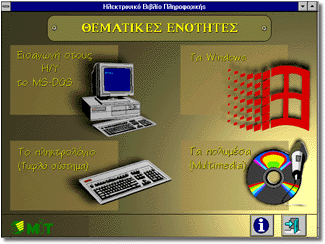
Our company, by taking advantage of the capabilities offered by the new technology, has completed a series of educational topic units such as:


The educational material operates under a graphic environment of the Microsoft Windows 3.1. It uses an especially simple and easy to use dialogue mode of communication of the user with the computer.

INTRODUCTION TO INFORMATICS - THE MS-DOS

1. Introduction to Informatics
Introduces into the basic principles of the science of Informatics and computers and comprises the following units:


2. Operation System MS-DOS
Introduces the user to the Operating System MS-DOS through a series of exercises covering the majority of commands and Operations of the MS-DOS.

3. Exercises of the Introduction to Informatics
The Majority of the exercises presented is based on the lesson ??Introduction to Informatics?? which must be read in order to be able to answer the exercises. Among others, there are exercises included from the areas of Operation Systems, Data Processing and Networks.

4. Exercising with a PC
Exercises mainly concentrated on the Hardware and the Software of a PC. The Central Processing Unit (CPU), the Random Access Memory, the Input/Output Devices and the Software are examined. The questions are in the form of Multiple Choice.


LEARNING MICROSOFT WINDOWS

1. Introduction
This lesson introduces us to the graphic environment of Windows (Graphical User Interface), describing their basic principles, starting from the use of windows and their operation with the help of the mouse and gradually moving to more advanced topics.

2. File Management
A detailed description of all the operations of the File Manager in Windows is given.

3. The Menus in Windows
Description of the standard menus in Windows, that is the menu where you can see it in every application which can run under a Windows environment

4. Print Management
It introduces the way in which you can print-out a text through some application, like the Windows-Write, as well as the description of choices in the Print Manager

5. Programs switching
Description of the way of switching between the active applications in the Windows environment and explanation of the way to use the Task List

6. Communication of Windows-MSDOS
Description of the way to move to the prompt of MS-DOS through the Windows environment.

7. Object Linking and Embedding
Description of one of the most important operations of Windows, the object linking and embedding-OLE. There is a detailed presentation of the way of implementation with the proper examples

8. Windows-Write
Detailed description of the operation and processing of documents in the Write. Although the possibilities of Write have been obsolete for a long time, nevertheless it still is a good introduction for a beginner user on the capabilities provided by the modern word processing packages

9. Exercises on Windows
Contains 19 exercises, each of which is linked with an educational unit

LEARNING THE KEYBOARD


The program has been designed in order to help with the learning and effective use of the keyboard. The organization of the lessons is a combination of research and many years of experience in the teaching of the touch system.

It comprises a series of lessons which must be examined by the user in a serial fashion. In every lesson there is practice effected in the fingers of the two hands combining the learning of a key for the right and one key for the left hand. In every new lesson there is a practice following which combines the use of the new keys with the ones that the user has already learned. In the end of each exercise a box is displayed with the number of errors, the accuracy as well as the speed of the keyboard exercise.

However, the most important thing is that the proper arrangement of the fingers and their proper use is displayed on the screen.

INTRODUCTION TO MULTIMEDIA


Introduction and presentation of the Multimedia, their technology (the MPC standard, sound, picture, CD-ROM, video), the development stages of applications as well as their fields of application.

Minimum system requirements

Suggested system

  • 386DX PC running at 40MHz
  • 4ΜΒ Ram
  • Single speed CD-ROM drive
  • VGA graphics adaptor with the capability of displaying at least 256 colours at 640x480 screen resolution
  • Sound card and a pair of speakers
  • 6 ΜΒ disk space in order to install the Dictionary of terms of Informatics

  • 486SX/33MHz Computer
  • 8ΜΒ Ram
  • Double speed CD-ROM drive
  • All of the rest as they are, according to the minimum requirements

| Mit Home | Previous page | Back to the top|

Copyright (c): 1996, M.I.T.sa All rights reserved.